Saturday, 30 March 2013

DirectX - Particle System

Made some changes and upgraded my particle system. Finally set it up so it works on the geometry shader which has improved performance by quite a lot. I get around 680 fps with around 80,000 particles.

Looks almost like snow!

The main problem I'm having currently is separating the emission rate from the frame rate, just now every frame it emits a new particle so it does this as fast as it can. This means that when the frame rate drops the number of particles emitted per second will be less.

Spiral particles

Currently my goal is to fix this, I've already got it generating 10 times as many points but there are some problems with actually getting them all to render in the same pass. Other than that, hopefully I will get finished up this week then can do some data analysis next week, comparing this system against the older CPU based one.

Still gets 680 fps with most of them visible


Email : markmmiller@hotmail.co.uk
Xbox Live : Dr Death MK 2
Steam : 7thsanctum

Saturday, 23 March 2013

Gaming Discussion - The Free-To-Play Model

Free-to-play mobile games are pretty rubbish. Here is why.

Recently, even more so than in the past. The free-to-play model for video games has become an increasingly popular method of marketing your game. In today's economic climate, why would you drop £40 on a so called 'AAA' title when it is just a rehash of previous game ideas or another sequel in a never ending saga.

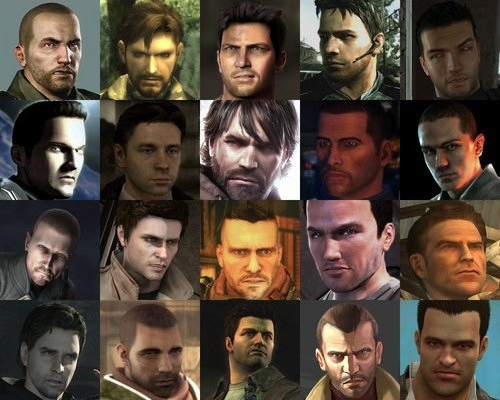
You can have any character you want as long as he's brown haired and in his thirties

Originally the popularity of the free-to-play was due to several Massively Multiplayer Online Roleplaying Games (MMORPG), such as Neopets and Maplestory as well as their ease of access. Practically anyone with a computer could play. Things got even better for free-to-play with the creation of Runescape by Jagex, a web based RPG with great graphics and sound gameplay. These games are still amongst the most widely played of the free-to-play games out there, and what they lack in sheer graphical fidelity and immersion that mainstream 'AAA' titles might have they make up for it in being wide reaching, affordable and not requiring advanced technology to run them.

It was no surprise then that the mobile gaming platforms of iOS and Android lapped up this model and soon a whole host of developers churned out so called "free-to-play" games like there was no tomorrow. This has led to a mass of games which are all identical in but name and graphical style. How naive was I to think that Jurassic Park Builder, The Simpsons : Tapped Out and Tiny Tower would have anything but identical gameplay. (I would mention many others as well but sadly I have no space here to list them all) They all follow the same format of building things, early on they emphasise the fact everything you do takes time (real time) and that you can speed things up with the use of money (real money). This inherently has nothing wrong with it, if your user is impatient why not give them the option to speed things up a little bit? That itself is fine, but when it gets to the point that a game is pretty much unplayable because you are sitting and waiting for the game to let you play then I think it is unreasonable. I got to a stage where the time it took to build a new floor was something along the lines of two real life days (48 hours), there is nothing else to do in that game other than collect rent and change the uniforms of your staff. There are no tactics, no thought. Nothing that can go wrong other than your lack of efficiency. It's matter of order building, collect money and then wait. Rinse, cycle and repeat. This can be said for every single of those games in those formats and is what I call preventative gameplay. Where a game actively tries to stop you from playing.

Another notable example is CSR Racing, a game in which you participate in drag races against other AI controlled cars. Each race requires a certain amount of fuel and you start off with around 10 units of fuel. Each race results in credits which you can then spend upgrading and buying new cars so that you can win bigger and better races, thus rewarding you with more credits. The main gripe I have with this game is the 10 units of fuel limit and the inability to just play races for the fun of it. If I use up all my fuel I have to pay real money to restock or wait through the timer. It's not like I can even play skirmish races that don't result in extra money but allow me to hone my skills. Of course, developers have to recoup their costs somewhere but I don't think it's fair for a game to advertise itself as free-to-play when in reality it's free-to-play (for a bit). It's not impossible to take this model and make it work.

Look at all those races I can't play 
Take for example World Of Tanks, a free-to-play tanks battling game much in the same way as CSR Racing has cars in it's garage you are instead filling up your garage with tanks. The main notable difference I find with World Of Tanks is that it does not restrict you from playing the game. At no point does it actively stop you from playing and ask you for money. Each tank battle nets you credits and before you head out into the next battle you need to repair and rearm your tank with credits. The amount you earn from a battle, even if you lost is usually more than enough to recoup the costs. I'm pretty rubbish and my tank finances are still in the black. Now is this model so hard to do? One of the incentives that the wargaming.net team always said was paying allows you to progress faster through the game. Double XP/Credits plus rarer tanks (which don't necessarily mean superior). Even other mobile games like Zombie Gunship don't stop you from playing just to ask for money. 

Not a single fuel indicator in site

There are many notable games out there that follow this free-to-play model that I would be more than willing to invest money into and have already done so in the past. Games such as Hawken, Age of Empires Online, Planetside 2, World of Tanks and Firefall stand at the forefront of my mind. Even notable games such as APB and Star Wars : The Old Republic switched from being subscription based to the free-to-play model and have been just as successful if not more so than in the past.

I think showing the player what they could get for subscribing but not forcing them too is always good.

The thing to note is all these games I have mentioned are PC games. Even Runescape and MapleStory are PC based games. Where are all the mobile games? Who knows my friend. Currently on my mobile device I have these free-to-play games; Zombie Gunship, Curiosity, Jurassic Park Builder, Showdown, Checkers and Wordament. Of all the games in this lot the only one I would put money towards are Checkers and Wordament and for those two I can't even work out how.

Do I think free-to-play is bad? Of course not, just certain ways companies and marketers push it out there harm it's effectiveness, sometimes even to the detriment of the game itself. This is what I think needs to change in free-to-play mobile games.


Email : markmmiller@hotmail.co.uk
Xbox Live : Dr Death MK 2
Steam : 7thsanctum

Thursday, 14 March 2013

Unity - Trail Renderer (with colliders)

Hey guys, just a quick post to show what I'm working on just now. I really ought to be doing some coursework but that's just no fun sometimes. 

So I was poking about in Unity and noticed that they have something called the Trail Renderer which acts like a particle effect that is produced as an object moves and leaves behind a trail. Simple stuff eh?

More info can be found in the Unity Documentation.

So after reading about this and trying it out with just basic colours my first thought was Tron! This inspired me to try and recreate the famous light bike scene from both the original and the recent sequel. Sadly though the light trails have no native colliders which made things a tiny bit more difficult. Instead of just leaving it at that I started adding in box colliders so that collisions with the light trail can be made easier.

Figure 1. Light Trail with Colliders
 As you can see, I'm currently finding it difficult to match up the length of the trail to the length of the trail of box colliders! Currently I have a few ideas how to match it up which I have yet to implement but another easier solution would be to just get rid of the light trail entirely and replace the code I have with textured boxes. I've yet to decide which technique will be better for this.

Figure2 . Close up of the trails Colliders still need resizing.
Anyways it's still a work in progress so I'll post updates when I can. You can find the latest version of this prototype on my Unity blog.

Also check out the following video which inspired me to make this :


Email : markmmiller@hotmail.co.uk
Xbox Live : Dr Death MK 2
Steam : 7thsanctum

Sunday, 10 March 2013

DirectX - Particle System

Currently working on particle systems and creating fire with smoke effects in DirectX 11. Things are coming along slowly but looking good so far.


I still need to implement fire as well as porting this to the geometry shader.

Check out this video for it in action.


Make sure to check out my OpenGL coursework from last year and stay tuned for more unity updates. I've also uploaded a new idea I'm working on in Unity to the Unity dev blog so check that out too!


Email : markmmiller@hotmail.co.uk
Xbox Live : Dr Death MK 2
Steam : 7thsanctum

Friday, 1 March 2013

SIE App Jam Day - Super Trolley 2

On the 27th of February I participated in the very first App Jam hosted by the Scottish Institute for Enterprise at Napier Univeristy. The task was to make an application for mobile devices in less than 9 hours.

I decided to make a game in which you had to run around a supermarket and try to cram as much stuff into your trolley as you could within a certain time frame. (If you've ever seen Supermarket Sweep you will understand where the inspiration comes from)

I developed the game in Unity3D with the aim to get the core gameplay elements in and then port to Android. Since I didn't have much time I avoided spending too much time in sourcing or creating assets, instead finding the main items free online. I figured getting the game playing well was most important.

Figure 1. The Player's Character.
After setting up the scene and setting up a system for spawning different items along the shelves I had to create the player. My original plan was to have the player attached to the trolley via their hands, left clicking with the mouse would lift up the left arm and right clicking the right arm. This would mean that the player had to maintain control over the trolley whilst trying to swipe as much stuff off of the shelves as possible. Sadly though I couldn't get the arms acting the way I wanted in the time I had so I instead opted to attach the player to the trolley through the use of a spring and have the arms fixed in place, extended.

Figure 2. The player after collecting lots of items
After trying to get the arms working which was my main goal, I realised I'd spent too long on this part which meant other parts of the project suffered. I finally added in a method of counting up the players score and measuring time. The game so far includes 2 items but adding more won't be too difficult.

I have many places I wish to improve this game, people at the Jam seemed to enjoy the parts they played despite numerous glitches so I will work on this some more when I get a chance to. Hopefully with more time I will be able to get the arms working!

Anyways that's enough from me, I haven't slept enough over the past few days so I better catch up this weekend. See you guys next time. 

Oh and here is a quick gameplay video where you can see how it works as well as numerous problems, I will upload a version for webplayer soon when I get some of the problems fixed.


Also thank you to Darren Whigham for organising this event check out his twitter here for some cool game development stuff. Thank you also to SIE as well as Informatics Ventures and Codeplay for attending.


Wednesday, 12 December 2012

OpenGL - Video

Here is a video showing my OpenGL application running. Make sure to watch in HD and put it to fullscreen as well.


The source code can be found here : https://github.com/7thsanctum/Intro_to_Graphics_Coursework

This includes the DLLs, Property Sheet and Libraries required to run the source code in Visual Studio 2010. It also includes an EXE in the Release.zip folder.

Monday, 10 December 2012

Java - Game Submission

For my Software Development module this year we were tasked with producing a game in Java. The primary purpose of this was to demonstrate our knowledge of patterns as well as other techniques learned in the module such as multi-threading. From this I created a space game with trading elements, inspired by the likes of Elite and FTL.

Figure 1. Main Screen

The players ship is at the bottom of the screen, the player can move by clicking in any of the squares surrounding the ship. If they try and click on a space too far it won't let them. When the player successfully moves the rest of the ships will take their turns and subsequent conflicts will all get resolved.


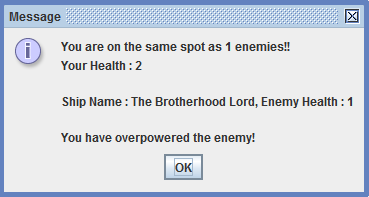
Figure 2. The results of fighting a single enemy ship

The main things that can happen when the player is on another square as something is Fighting and Trading. The player can battle space pirates, the current system just compares the health value of the player to the cumulative health value of the enemy and whoever has the highest wins! If the player is on a planet when they are attacked, the planet will send reinforcements to assist. In future I intend to upgrade this system to be more detailed, to include things like weapons and shielding and health bars that are affected by each combat, allowing the players and enemies to run away.


Figure 3. The result after a player is attacked in orbit around a planet.

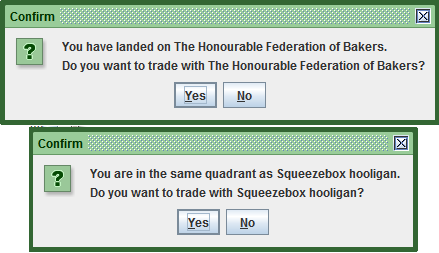
Trading is the other part that plays a key role in my game, when the player lands on the same spot as a civilian ship or a planet with no enemies on it they may trade with them.

Figure 4. The options to trade with either planet or civilian ships.

 If the player decides  to trade with either they will be shown the trading screen and their trade partners inventory. They can trade any item for any other item and the value will automatically be calculated and deducted. I intend to upgrade this system so it could include more resources and so that resources have some form of function for your ship, such as fuel and armour etc. I also plan to have a central economic manager, much like a universe trade centre in which buying and selling of goods affects their worth in different planets and sectors of space. This way you could visit a planet, buy the goods that are bountiful there and sell them at a profit on the other side of the universe.


Figure 5. The trade screen

Overall I feel my game was a good start in my foray into the world of Java and Eclipse. It took me a while of battle with the IDE but eventually I managed to get something functional out of it. It requires much more work and a few of the systems still require a lot of polish but hopefully with a bit of time I will be able to get that done.


Friday, 7 December 2012

OpenGL - Report

Introduction

I was directed to create a 3D scene using OpenGL. This process began with early ideas, preparation and planning. I set out to create something vibrant and interesting, something that would give the user a unique experience. The way I went about trying to achieve this was through writing out and illustrating original ideas and thoughts.

As soon as I had a basis to work from I went on to research and create this scene. Along the way ideas changed due to various problems encountered over the course of the project and this influenced the final result.

Scene Design and Inspiration

During the process of coming up with ideas I used paper, I illustrated and made notes on everything I thought of and felt could be used in my final scene design.

My early ideas included the concept of using video as texture, for example, creating billboard-type objects and placing moving image on them. I enjoyed this idea because I thought it would create a new and interesting atmosphere for my scene, a change from the usual use of still image. I also liked the fact that it would perhaps give my scene a futuristic feel.

Another idea involved the use of multiple cameras; I liked this notion because it enables you to see from multiple angles at the same time (bottom left, figure 1). This is one of the ideas I put into my final design (figure 6).

I also thought of using a camera view as a texture for an object which could then be viewed by another camera. The moving image and camera texture ideas did not make it into the final design mainly due to time constraints but there are still fragments of code in the project where I attempted to achieve this. 


Figure 1 - Initial Plans 


The contents of my scene gradually changed to suit certain needs and many ideas didn’t come about until the later stages of the project.

My solar system idea did not come until I changed the skybox from the original to an outer space one that I had found online. Once I had this backdrop I naturally leant towards the inclusion of planets and creating an orbital system, it fit nicely with the setting and resulted in my final scene (figure 2). 


Figure 2 - Alternate Plans 


When I realised I could not include certain early ideas, I rethought and created something almost completely new and separate to my original notes. I did, however, manage to keep my multiple camera idea which made it into the final program (figure 3).

Figure 3 - Early Protoype with Multiple Cameras 

Background Research

For this project I investigated reading in AVI from files as well as other post-processing techniques. Whilst learning, I did an AVI tutorial by NeHe [1] which proved to be very useful, I managed to get the project reading in the video to a texture in memory but I could not get it to apply correctly to any particular objects.

Figure 4 - A frame of the video as seen in gDEBugger 

I did not want to spend too much time trying to get this to work and so I instead focussed my attention on other things. After creating my scene I did some research into post-processing techniques, after managing to implement the Sobel Operator in the edge detection shader I read about the Scharr Operator and instead implemented that (figure 5).

Figure 5 - Scharr Operator (Left) vs the Sobel Operator (right), not the more vivid stars as well as being abl to see the terrain much clearer in the distance 

I also studied into the implementation of multiple cameras which was made easier by the use of glViewport() [2]. After successfully adding the camera views I realised I wanted to add in the ability to set custom resolutions, set the program to full screen and to hide the mouse which was made possible with the documentation that comes with GLFW [3].

My final research involved gathering general information about the solar system and the orbits of planets around others. I mainly referred to Wikipedia pages [4] and other science websites [5] for specific information before implementing it within my project, I wanted to make sure everything was accurate. Most of the textures I have used were found on Google Images [6]

Implementation

Figure 6 - Final Space Scene 

Figure 6 is my final space scene, for this scene I used the point sprite effect to model the stars shooting past. There is spotlight which is attached to whichever object is in current focus. The current object that is being looked at can be changed by using the numbers on the numpad. 

I created a piece of terrain using a heightmap which is the large bumpy panel on the floor. Also for this heightmap I used procedural texture generation to create a texture upon start up. The application will auto detect your monitors native resolution and set that as a default.
I offloaded the calculation for the procedural texture generation to a separate thread so that it didn’t interfere with the program as much and so that it could perform the calculations whilst the program ran. This significantly reduced load up times and allows the texture to be updated during runtime.My final implementation includes the Sepia Tone, Blur, Motion Blur, Sharpen, Sobel and Scharr edge detection post processing shaders. These can all be switched between during runtime. I have also used the dissolve effect to dissolve the entire scene. The orbits of the planets have been scaled down. The actual planets revolve around the sun in a fashion similar to their actual orbital revolutions. The sun has not been scaled but the rest of the planets as well as their moons should be close to their real life counterparts.

Performance Evaluation

Using gDebugger I analysed my program at different settings. Each of the following images (figures 7, 8 and 9) demonstrate the program at different resolutions with and without anti-aliasing enabled. For the test cases the same parts of the scene were looked at in each example, they were done multiple times to ensure that the final screenshot was of one that appeared to be the average.

Each column is labelled with (from left to right) Frames Per Second, OGLCalls/Frame, CPU Average Utilization, Texture Objects, Vertices/frame, Triangles/frame, Points/frame, Primitives/frame, texels and Used Virtual Memory in bytes.

Figure 7 - 1920*1080 with No Anti-Aliasing 


Figure 8 - 1280*720 with No Anti-Aliasing 


Figure 9 - 800*600 with No Anti-Aliasing 

After looking at these results we can see that the majority of the statistics have stayed the same regardless of the resolution. The main consistent changes are in texels and used virtual memory showing a 10byte difference between the resolutions.

I attempted to perform Anti-Aliasing at 4x, 8x and 16x. It did not function correctly below 16x and only at this level made a significant effect on the system, dropping the frame rate well below 20 FPS on all resolutions.

Test System 1 details :-

CPU – AMD Phenom X6 1055T at 2.8GHZ
GPU – GeForce GTX 460 1GB
RAM – 16GB – 1600MHZ

Overall Evaluation/Conclusion

Despite missing my primary goal of including the AVI and camera texture effects I still managed to use many different effects including terrain generation, skyboxes, procedural texture generation amongst many others. During the process of creating this scene I have learnt that there is much to take into consideration when embarking on a project of this nature. It is important to allocate myself sufficient time to learn and fix problems that are found throughout the project lifecycle. Had I managed my time better I would have done further research into how to implement my original ideas and expanded upon those that have already been completed. I feel that in the end I managed to create an interesting scene and overall have something that I am happy with. 

The program will be available on GitHub soon.

References


1. Jeff Molofee. (2012). Playing AVI Files In OpenGL. Available: http://nehe.gamedev.net/tutorial/playing_avi_files_in_opengl/23001/ . Last accessed 4th October 2012.


2. Jeff Molofee. (2012). Multiple Viewport. Available: http://nehe.gamedev.net/tutorial/multiple_viewports/20002/ . Last accessed October 2012.


3. Camilla Berglund. (2007). GLFW Reference Manual. Available: http://www.scribd.com/doc/56552343/GLFWReference26 . Last accessed 7th December 2012.


4. Multiple. (2012). Sobel Operator. Available: http://en.wikipedia.org/wiki/Sobel_operator . Last accessed 7th December 2012.


5. Multiple. (2012). Solar System. Available: http://en.wikipedia.org/wiki/Solar_System . Last accessed 7th December 2012.


6. James Hastings-Trew. (2006). Planets. Available: http://planetpixelemporium.com/planets.html . Last accessed 7th December 2012.